 I'll have worked 82 hours if i work a full day today





CVGM Radio

 Development Area » Newly Added Site Changes
| Author | Thread |
|---|---|
 FishGuy876 FishGuy876 FishGuy876 / Brainstorm 


495 Posts #432 (15 years, 9 months ago) |
Hi, From now on, all site changes & code updates will be posted in this single thread as a single reference thats easily found by everyone. Adding these updates in individual threads was a bit confusing at times. Once again, Terrasque has been working hard on the next set of site changes. Internally, he has been making lots of changes to the caching system, where the site will now cache the queries from the site pages, rather than the data thats displayed on the site. He has also re-written the smiley parser so it is now far faster than before. Both of these changes have increased the speed of the site dramatically. To celebrate the occasion, I restored the old smiley database and the site is still lightning fast  Some of the additional changes that have been included: * Player Preview - This has been moved to a window of it's own. It is still sharing with the new Java player that we are experimenting with, and it no longer clutters up any of the view screens (especially for moderators). * Many templates have been streamlined, which makes the code look less crap and also takes advantage of other features in the code base. * Some work on translation support has begun, though the effects won't be seen until a future update. * Smiley spam filter. Site owners can now limit the number of total smileys per message, and the number of times a single smiley can be used in that message (to stop a flood of the same smiley being used) * Fixed some bugs with non-english characters being displayed incorrectly in song title and artist lists. * Compilations can now be edited by staff and use the same drag/drop ordering on songs. This is still being tested and so might not be available to everyone yet. As always, be sure to thank Terra for the great changes, and if you have any bugs or problems to report with the changes, you may do so here in this thread. Thanks
|
| Quote | |
|
FishGuy876 FishGuy876 / Brainstorm
495 Posts #436 (15 years, 9 months ago) |
Hi, I have updated the search code on the site to the latest version today. The old search has been removed, and replaced with what was the Beta search before. This see's some great improvements to the amount of information found when searching on the site. In addition to this, I have now set up automatic polling of the search data to a 15 minute interval, so if something was just recently added to the site it might not show up on the site for up to 15 minutes (probbably only most notable on areas like compilations, but you can still use the SongID as the search term). I will update the internal Whoosh system later in the week, as some updates have been added to the tool that will make search results a little faster. If anyone has any questions, feel free to ask. Enjoy! |
| Quote | |
|
FishGuy876 FishGuy876 / Brainstorm
495 Posts #445 (15 years, 8 months ago) |
Hi, I have applied several major changes to the site today. Firstly, I addressed some issues regarding other sites using our data in theirs, and making it look like their own. This now shouldn't be a problem, and people won't be fooled into thinking that it belongs to someone else It will also stop Google posting results for everywhere but our site Additionally, I have removed the slacking gloves and updated many other things. Firstly, I caught up on the 8+ revisions of the web server we use, so that is now up to date with many new speed & internal cache improvements. The box that CVGM runs on has also been brought up to date with the latest Linux kernels and internal software. The site software has also been upgraded. The search engine has been upgraded to the very latest versions of Whoosh and Haystack, and the other python/django pieces that go with it. Also upgraded were the internal django setups, new search indexes built and everything else. You will immediately notice all search operations are now considerably quicker than they were before! I have also updated the statistics section of the site, adding 2 new statistic features (Random and Least Votes). Random picks 100 random songs from the database, so if you get bored you can just queue some of the random findings! Least Votes show the tracks on the site which have the lowest vote counts, so you can listen to them and place your votes. As always, if anyone has any questions feel free to ask FishGuy876
|
| Quote | |
|
FishGuy876 FishGuy876 / Brainstorm
495 Posts #489 (15 years, 5 months ago) |
Hi, There have been a few site changes over the last few weeks, this post will try and go over some of the massive changes that have occured so you can familiarize yourself with them. CVGM Has now moved to a fully 64bit linux installation. This has remedied a few problems we were having with the site, the software it uses, and server load. Now that the site is becomming more popular to listeners, we needed to upgrade so that we can keep up with the demand. We don't expect that we will need any more major upgrades in the future, but you never know! Thanks to Rams for donating storage space to use during the migration process. Screenshots - One of the biggest visual changes to the site is the use of Screenshots. This system is still under development, and I have mnade a seperate forum thread to talk about it. To learn more about the screenshot system, please read  Working With Screenshots On CVGM. This will also explain how to add screenshots to songs, navigate existing ones and more. Working With Screenshots On CVGM. This will also explain how to add screenshots to songs, navigate existing ones and more.Compilations - The way that compilations are created & edited has now been altered. It is now possible for any registered user on the site to creat a compilation using any songs in the database. To create a new one, simply browse to the main "Compilations" page and click "New Compilation". A Screen is presented with the usual fields for creating the compilation setup. The new part is at the very top, you can search for songs by name, or typing in their SongID numbers. Once songs are found, you can drag them into position underneath, even controlling the order that they appear in the compilation. Once your compilation has been created, you should let a member of staff know that its waiting as it won't be active until they approve it. Staff members can edit any existing compilation on the site by appending /edit to the end of it's URL. A more detailed page for creating compilations will appear soon. User/Site stats - Visit any profile of any user and you can now see some stats about them and the site, see how many times they have chatted in the oneliner, how many tracks they have uploaded and also how many votes they have cast on songs. There is also a new "Recent Updates" section of the site, which displays the most recent changes to all Groups, Artists, Labels, Songs & more. See at a glance what is being changed on the site, newly added artists etc. Better OpenID support - If you have a compatible OpenID account with another site or service, you can now use it to log in to CVGM. You can now log in using a Google, Yahoo, AOL, OpenID, LiveJournal, Wordpress ID and many many more! Try it today! Song Licenses - You can now assign licenses to songs, and we have started off by adding the most common Creative Commons licenses to the database. These licenses control how songs can be edited and distributed. As always, any other major updates we make to the site, we will keep you in touch. Thanks! |
| Quote | |
|
FishGuy876 FishGuy876 / Brainstorm
495 Posts #594 (15 years, 2 months ago) |
Hi, Updated the codebase a little bit tonight. Terra has fixed some issues in the XML system, I will paste his message from http://www.scenemusic.net/forum/thread/387/ here. If you see of people reporting issues with remote clients, this is most likely why : Terrasque said: "Some changes to queue XML : 1. every entry now have a playstart value, which is either when it started playing, or if its future queue, when it's expected to play. - note that time left is removed. Since server sends local time in header that can be calculated on client side. 2. Rate limit on XML, max 20 requests per 600 seconds (10 minutes). That averages to one request every 30 seconds. Also, there's some slight caching on it now (15 seconds), to better handle mass requests. Both of these changes are mostly because some broken clients (windows sidebar widget have shown to do this twice before) gets into an infinite request loop (and chew up a lot of cpu and bandwidth), so these changes was added to combat that problem." Other minor changes: * Screenshot fix if pouet prod alrady exist in image db. * Improvements to Tab Completion. * Unicode strings in dv_extend, and several other internal changes. Thanks! |
| Quote | |
|
FishGuy876 FishGuy876 / Brainstorm
495 Posts #602 (15 years, 2 months ago) |
Hi, Over the next few days I am going to implement a few changes that may affect the site. Firstly, our DNS provider (EveryDNS.net) will be moving their system over to DynIP, so I must also move over my settings to their new servers. Hopefully, this won't cause any downtime to the site. Secondly, I am going to be migrating the streamer to an older version to get things back in syncronization with each other. This older version has a few known problems, and from time to time when it crashes it will eat some of the queue entries. Unfortunately, this will have to do until the newer stream versions are fixed. As always, if anyone has any questions, feel free to get in touch with me via a PM, or use this forum. Thanks! |
| Quote | |
|
FishGuy876 FishGuy876 / Brainstorm
495 Posts #627 (15 years, 1 month ago) |
I have made the changes to the streamer, and so far they seem to be working quite well. We have gone back to an old BASS-powered version of the stream, which cuts down on the delay between the site and the stream. This new version does add some other problems, as always Firstly, this version carries the queue-eater bug where if the streamer crashes, it munches away at some of the queue entries before it restarts again. Secondly, if you listen to the stream for long periods of time, it slowly gets out of whack as songs change. After 4 hours of listening, you may be off by about 20 seconds or so. Simply restarting the stream fixes this issue.In the next day or so, I will begin to switch the DNS. I am also having to downgrade the server that CVGM is running on to ensure I can keep paying for it; Situations at home have changed a bit and I cant afford to splash out on an expensive server for the time being. The last thing I need is a lapse of CVGM being offline for a month or two =/ If you know anyone with a spare million bucks, now would be a good time to donate it As these changes begin/commence, I will keep you posted with whats going on. Once these changes are done, I am going to start recoding some bits of the site. Stay tuned! |
| Quote | |
|
FishGuy876 FishGuy876 / Brainstorm
495 Posts #882 (14 years, 6 months ago) |
Its been a bit of time, but I have applied some new code changes to the site, mostly bugfixes that Terra has been working on from a while ago. There are not many major new features, except for a theme browser, which I need to set up properly and link to it later. If anyone has any issues on the site, let me know. Thanks.
|
| Quote | |
|
FishGuy876 FishGuy876 / Brainstorm
495 Posts #1086 (14 years ago) |
Its about time that this thread was re-opened As of October 2012, CVGM has moved the code repo to SVN on Google Code. The previous repo was hosted by Terrasque on Gitorious using Git, and several people didn't like to use the tree very much as they found Git a bit overpowering. I myself don't like to use Git, which is why I have opted for an SVN repo instead. All future bugs and issues for this site should be posted on the Google Project page above, or here in the forums. If you do find a bug on the site, Check It Hasn't Been Reported Already before making another ticket. You can also look at the code exactly as it runs here and make suggestions and changes for other bugfixes. |
| Quote | |
|
FishGuy876 FishGuy876 / Brainstorm
495 Posts #1087 (14 years ago) |
Small Changes For Today: * Stats/Voted - Songs with the highest overall rating are shown at the top of the list, they are now sorted also by the number of votes cast, so high voting songs with high vote counts (rather than a 5 star song with only 1 vote) will display at the top of the page. * Fixed a template bug where a song didn't show which songs had been remixed based on itself. * The 'Who's Online' section now shows X most recent members, where X is a value in settings_local.py Other fixes over the last few days: * Added a change that lets site admins turn off the email notifications when new song info is approved. The system will still email a user if their request is denied. * Added additional flags. There should be no invader flags for certain countries anymore. * Improved Thumbnails - Site now makes better, high quality thumbnails of screenshots. Site admin can also alter the output format of the thumb (between JPG and PNG) and a few other settings such as quality. Low colour screenshots (such as Spectrum) now convert at a much better quality then before. See the below comparison of thumbnail images: Original Image (Unaltered):  Previous Thumbnail Attempts:  New Thumbnail Attempt: 
|
| Quote | |
|
FishGuy876 FishGuy876 / Brainstorm
495 Posts #1105 (14 years ago) |
Hi, More big changes \o/ The first big change on the list is the streamer. The site is now using the most recent version of maep's Demosauce streamer. The version we used before was at least 2 years old, the new one fixes countless bugs, has better system performance, and puts the stream in far better sync than ever before. There are also several internal systems on each song page's admin panel that can now be utilized with the new code, such as picking a BASS replay method for specific mod songs, and a few others. If any bugs or problems crop up with the streamer, let me know. All the missing flags from the new country box have now been added. I dont think there are any left that show the Invader flag anymore. The Voted stats page (here) now sorts tracks by the best rating. Songs with the best ratings are sorted to the top. Songs with a max rating of 5 will show by order of the most votes cast first, making more popular voted songs appear on top. The New Members section of the site now shows the last 5 members to join the site. Don't be afraid to say Hi and welcome them to the site when you see them online Maximum length for a song name has been extended to 128 characters, and filenames can be a maximum of 256 characters. Filenames should never be that long anyways, but it is there just in case. I have altered the thumbnail/screenshot section again. I have added a couple of minor optimizations which will only be effective on a handful of images and image types, but the outcome will still be clean crisp thumbnails depending on the source image. I have also added the ability for staff members to alter the current thumbnail for any screenshot. There are many thumbnails on the site that just look crappy due to the old scaling methods, such as GIF images scaled with very low colour counts. All that the staff member needs to do is go to the screenshot page. Staff members now see an additional pane related to the thumbnail for the screenshot. After the text is a link named "Rebuild Thumbnail" which will rebuild the thumbnail based on the current image, using the settings for images defined for the site (output format and quality settings, CVGM uses PNG with a quality setting of 90). If you are currently using a custom thumbnail, it will be erased, and the scaling does not take into effect for AnimGIF files (you can still do those manually in the Admin panel). Below is a screenshot showing the effect, and what the panel looks like. The thumbnail on the Left is the old, crappy GIF that was present. The thumbnail on the right (thats merged into the image) shows the new thumbnail after rebuilding. Much better quality  |
| Quote | |
|
FishGuy876 FishGuy876 / Brainstorm
495 Posts #1109 (14 years ago) |
Another Before/After example of thumbnail cleansing:             I'll stop showing examples or my OCD will have me update the entire screenshots section 
|
| Quote | |
 Goatfather Goatfather |____/_/_/_/_/_| 96 Posts #1110 (14 years ago) |
Thumbnail feature is totally awesum.  It's so good, that - actually - is there any reason to keep old manual thumbnail upload on the screenshot form? Thanks! -gF |
| Quote | |
|
FishGuy876 FishGuy876 / Brainstorm
495 Posts #1111 (14 years ago) |
The thumbnail portion of the Admin form is put there automatically, when a new screenshot is uploaded the thumbnail is generated automatically and added there. Removing it isnt required, especially as some screens may want custom thumbs (such as anim gifs)
|
| Quote | |
 Stefan_L Stefan_L Deleted by request 167 Posts #1112 (14 years ago) |
I still use it for animated gifs
|
| Quote | |
MAT Objection! 106 Posts #1113 (14 years ago) |
I wonder how it will work with interlaced gif images, like in Red Alert or Gabriel Knight 2 for example Gotta test it. It really peeked my curiosity
|
| Quote | |
|
FishGuy876 FishGuy876 / Brainstorm
495 Posts #1281 (13 years, 4 months ago) |
Hi, I have recently applied a couple of large patches to the site full of changes, so this post will go over some of the more important ones, so you know what to expect when things are different! Cross-browser sorting of songs by queued status - When viewing your favourites list, instead of sorting by the last request date, you can now sort by the Locked/Unlocked status as well. Patch by  debo. debo.Linking Only To Active Screenshots - When adding/linking to existing screenshots, only ones that are Active will now work. Pending screenshots must first be approved before they can be used. Patch by debo.Recent Forum Posts - When you visit the Forums page, you will now see a list on top of the most recent forum posts. These will also show if they were posted in the same subject, so you can tell if a particular thread has been busy. Anonymous Screenshots - Users who are not logged into the site, such as those just having a peek around for the first time, will now be able to see screenshots for songs that are playing. The old code didn't allow this, so I added this patch (which is controlled via a setting) so the site looks a lot nicer to others. It will also show the average vote rating for songs underneath the title, just like you were logged in. Obviously, you cannot place votes unless you are logged in. Browse Songs By Year - View all the songs that are released in the given year. You can view all songs for say, 1989 by going to http://www.cvgm.net/demovibes/songs/year/1989/. It also works when you view the Song Details of any song in the database, and clicking it's year (which is now a hyperlink). Invalid years will result in a blank results page. All results are paginated, and can be navigated very easily. Oneliner Muting - See below for a more detailed description of this. Other smaller bugfixes & changes: * Fixed the titling of several statistics pages, so they now have a meaning ful title in the tab/window. * Adjustment of Registration/Password Reset forms to be a little more clear on their instructions. * Fixed the bug where all 5 star rating counts were not shown in overall stats. * The vote counts for each rating were backwards (0 was actually 5 stars, 5 was actually 1 stars etc.) so this has been corrected to show the right number for the right vote count. * Cleaned up the templates for the Overview statistics for the station. Better wording & clarity on some areas. * Site can now globally disable all uploads with a simple setting change. This will mainly be used only during maintenance periods. In the past, the upload forms had to be disabled manually, which didn't always work. * When adding a new compilation, the number of song search results is now controlled by a setting, so they can be increased/decreased accordingly. * Several other template tweaks & instruction/help text alterations. * Support for multi-artist uploading will NOT be added in the near future. Several internal code changes have been made, using patches originally done by  terrasque and modified by me for use on our code tree: terrasque and modified by me for use on our code tree:* Made adjustments to the internal event system, so its not always trying to do everything immediately. It also helps to balance out load when a lot of stuff is going on. * Fixes to the Event Handler system, JavaScript idle user changes, again all helping to reduce site load. * OneLiner History Searching. * Per-User Smileys, & Smiley Improvements to increase speed & handling internally. Oneliner Muting In the past, we have had some issues with users that just needed to be banned for various reasons, or sometimes people need a warning when they are being offensive to others. The site now has Oneliner Mutes, based on a code patch by Terra (my original patch worked quite different, and this patch is actually a lot better than mine). In the event a user is getting out of hand, any member of staff now have the ability to mute that user (which prevents them from speaking in the oneliner, or doing anything else on the site for that matter) for a specified period of time. The default is 15 minutes, however depending on the event, a user can be banned for up to 7 days. There are also measures to prevent users with many alts getting around this, as the site (optionally) will ban the IP address the user had logged in with. This will prevent the main user logging out, and logging in with an alt. When a ban is posted, a notification will appear on the top of the screen like any other (unless you have notifications turned off). Staff members can see a list of all active bans, and ones that have been issued in the past. As always, if you have any questions about this set of patches, or anything else with the site, feel free to post a reply here, or start a new thread, or contact me directly. If you find bugs on the site that need fixing, or you want to request a new feature, I reccomend you add a new Issue to our code tracker over at https://code.google.com/p/demovibes-cvgm/issues/list. This also shows the currently Active/Inactive issues we are dealing with. Thanks! FishGuy876 |
| Quote | |
|
FishGuy876 FishGuy876 / Brainstorm
495 Posts #1282 (13 years, 4 months ago) |
Something I forgot to add was a change to the OneLiner text box. Depending on your browser, you may need to empty the cache if you don't see this change appear. The text that you normally click under the box to show smilies has been altered. Now you will see a "Link:" tag, followed by a "Page" and/or "Smilies". Clicking Smilies will naturally take you to the list of available oneliner smilies, which you can click and it will be instered into the text box. The "Page" option appears when you are viewing any forum, song, screenshot or other detail page. When you click the Page button, it inserts the bbcode for the object in view. If its a song detail page, it'll insert the [ song ]SongID[ /song ] tags for you (SongID being the ID number of the song for that page. |
| Quote | |
|
FishGuy876 FishGuy876 / Brainstorm
495 Posts #2069 (5 years, 7 months ago) |
Hey Everyone, Just a small post about some site changes I have been working on. My main job is calming down a bit, so I am hoping to get more time devoted to working on new changes and features for CVGM. I know I have been slacking for quite some time, I recently set up a new dev server and have been tinkering around with a few things. I added a change to the way that Favourites are listed. In the past, I always had the same bunch of favourites up on the top few pages because I didnt want to play them, or they were too long. My favourites list is also a couple of thousand entries long now  The new change re-arranges the one favourites column (now titled Last Played). When I pull up the list of my favourites, this column now shows the date when the song was last played (actually played). Previously, it showed when it was last requested. If you sort by this column (as I do) then the songs that have not played in a long time will appear at the top, and recently played stuff at the bottom. If you click the header again it will sort the list the other way. I wanted to change this to refresh favourites that haven't played in a long time, so if the song plays (even if it's by DJ Random) it will change order and hopefully those stale lists of favourites on top of everyones pages should start to disapear. If you have other ideas and feature requests for the site, feel free to post about them in the correct areas and I will see what I can do to add them. I have started going through old posts and making some lists of things to work on, and always like to listen to new ideas FishGuy876 |
| Quote | |
|
FishGuy876 FishGuy876 / Brainstorm
495 Posts #2107 (5 years, 2 months ago) |
Hi All, I made a small change to the streamer code this week and was documenting it here before I forgot about it. The actual commit details can be found on GitHub Here. What was happening when a large song/set was being uploaded is the scan tool was timing out after a few seconds. At the time, CVGM was using V0.4.0 of the old scan tool codebase (compiled long ago in a galaxy far far away) as I had an old not to update from eons ago and just never really got around to it. Anyways, the limit on the length of the song to scan is contained in the streamer source code, so I applied a change to the length and recompiled both the streamer, and the scan tools to reflect this change. I also modified the CVGM code to work with this newer version of the scan tool, so as we recompile in the future there should be no more problems. I do beleive that there is a new version of Conrad's streamer, but I cant say for sure how compatible it is with the code and I will assign myself a task to look at that in the future. Also, I have put an issue in the bugtracker to modify the current code to work from a setting within demosauce.conf instead of having to recompile the app every time we want to make a change. As always, should anyone have any issues or problems please let me know. Thanks! FishGuy876/BRS |
| Quote | |
|
FishGuy876 FishGuy876 / Brainstorm
495 Posts #2115 (5 years, 2 months ago) |
Just a quick update on the streamer update. I found a potential problem with a few mp3 files, and even though they were just 3 or 4 minutes long, the were still failing with length errors. I applied a temporary fix to the code at CVGM, and I added a comment to dscan.c file (See the commit Over At GitHub). I ran some testing on a few mp3 files and there appears to be no problems caused by commenting out the time checking; If the file is somehow messed up, it will be flagged as an invalid format before it causes any major issues anyways. Thanks! FishGuy876 |
| Quote | |
|
FishGuy876 FishGuy876 / Brainstorm
495 Posts #2139 (4 years, 10 months ago) |
Hi Everyone!  I have been doing some work on the streamer code again this week. The last changes I made to help with the longer songs being uploaded were not the best or the most stable, so I have been working on a more stable solution to the problem. Firstly, I have upgraded the streamer code to the most recent version from maep's repository (which can be found at https://gitlab.com/maep/demosauce for those interested). It's not on Github, so I created a new branch on the demovibes-cvgm repo just to handle work on the streamer. By updating the streamer, it was very obvious to me that the following fixes have already occured: - The most recent code is being used, with OpenMPT and all the other bells and whistles in maep's repo. - Scanning of long songs is now working as it should; We will need to fix a couple of issues on that anyways as we progress. - Demosauce no longer crashing when longer songs are being played, after the song has finished. - BUG: If the dscan and demosauce tools cannot find the libbass.so shared file, manually copy it to /usr/lib/ manually to fix the issue. The old tools used to create a symlink to the files locally. Its located in the lib folder and is automatically downloaded during the make process. After building the new tools, I have applied the following fixes to CVGM: - There should be no more issues with uploading files and a 500 error due to the format being unrecognized. If you have an issue, send me a PM or post a comment here with a link to the source file so I can see whats going on. - As a side effect of the new scan tool, scans do take longer to complete (the 1.5 hr lug00ber song takes about 15-20 seconds after uploading) but im OK with the extra time as long as it works correctly. - To combat the extra time, the initial scan will calculate the replaygain values at the same time. In the old code, this would scan a 2nd time to retreive this value. Now, we will only scan for just ReplayGain if it's set to a NULL value in the Admin Panel. - I have currently disabled maximum song length uploads. See below in the fixes for some extra notes on this topic. - Link to the Streamer branch can be found here: https://github.com/FishGuy876/demovibes-cvgm/tree/demovibes-streamer Stuff to fix in the future: - I want to go through all of the code and just make sure that all the features are being used, and being used correctly. I might even re-write parts of the dscan.py file in the future to optimize it, or just wait until a django3 version of cvgm is in testing properly. - I want to move the fixed in-code maximum length of a song to being a value in the settings file. CVGM doesn't really care too much about the maximum length at this point, but for other sites that use the code it may be beneficial to them to have such a limitation. The code also needs to recognize this and handle it correctly instead of throwing a 500 error. - I want to modify the dscan tool to properly log whats being uploaded/scanned etc. to better help with troubleshooting in the future. I want to extend a huge thanks to maep for his continued work on the streamer, and to everyone else at CVGM for their patience. Thanks guys! FishGuy876/BRS |
| Quote | |
|
Goatfather |____/_/_/_/_/_| 96 Posts #2140 (4 years, 10 months ago) |
Thanks for keeping CVGM wheels rolling, Fishy. You are The \o. |
| Quote | |
|
FishGuy876 FishGuy876 / Brainstorm
495 Posts #2247 (10 months, 2 weeks ago) |
Oof, it's been a while since I last posted in this thread! Although I try to keep my covert undercover operation of being a complete slacker as visible as possible, there have been a lot of goings on in the last few weeks or so, even longer actually. This post is just to bring some of those features up to date for everyone to read. I'll start with some of the oldest changes first from the repo hehe f7ec6d6 and 0512602 and 21dc8cb - Implementation Of Spam Administration Pages This is a new module that any moderator can use to check for potential spammy profiles, song comments etc. and do something about them from there. There's a setting to control how many profiles get shown, but the site will show the most recent created accounts, and accounts of users recently logging in. From there, profiles which are obviously advertising shady casinos etc. can be deleted and removed from the site. Song comments also containing spam links can also be deleted. Still lots to work on with this feature, but it is slowly coming along and will most likely not change until the next codebase is released. a6f0d99 - Tweaks To Memcached Stats CVGM uses memcached on the server to cache things such as sql queries, pages, user data and song titles so the database doesn't have to keep rebuilding them/requesting sql every single time. The summary page shows a bunch of jargon to tell me how well the cache is doing. If i see it going really badly, then I know something else is broken  I have been tweaking a lot of stuff to make better use of this, and it's quite normal to see so many dropped/evicted items especially if the site has been online for a while. I have been tweaking a lot of stuff to make better use of this, and it's quite normal to see so many dropped/evicted items especially if the site has been online for a while.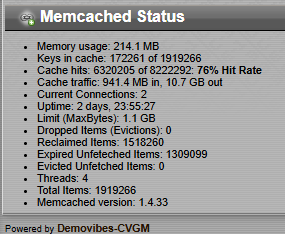 Other Tweaks Ive been tweaking various templates and forum posts lately to get the best display out of them. For example, a profile page will now show how many times that user has queued songs (unless it's private), and corrected a few spelling mistakes here and there. I'm currently working on fixing the email templates that go out to new users, i still have a few classic forum posts to update, and then im going to create a new large megapost aimed at new users on how everything works on the site, like an introduction on how to queue/favourite songs etc. The goal is to work on making the site much friendlier and easy to use for new guests. I would like to get the site appealing to more people, SEO stuff isn't my forte, but I guess if i start writing some intros/demosa nd mention cvgm we can start getting some mentions in other prods hehe MySQL Changes Seems to be a big thorn in my side lately, the site is getting bigger and the current SQL is really showing its age! Just in the past week I made some more changes to SQL to fix issues such as voting and uploads from pausing/showing 500 because the database was waiting. Tags were also a problem, when tagging a song. I still have most of the Tags code disabled as its really bogging things down and need to come up with a better solution for that. For those that have been asking, the SQL data is backed up 3 times a day  All songs and important settings are backed up to a floppy disk stuck to my fridge with a nice magnet to make sure it doesn't go anywhere!! All songs and important settings are backed up to a floppy disk stuck to my fridge with a nice magnet to make sure it doesn't go anywhere!!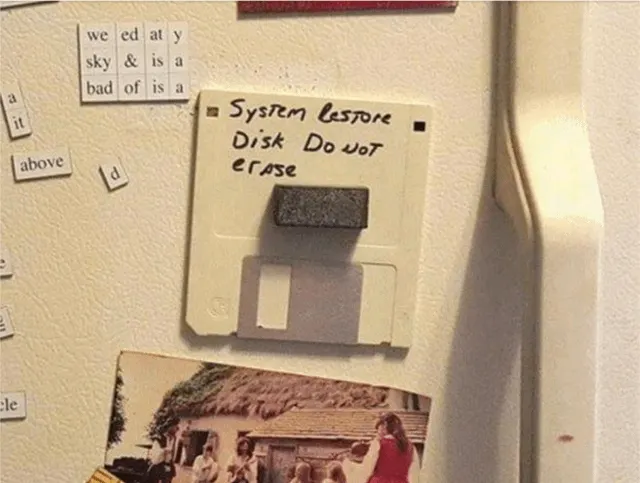 CVGM 2.0 Work is slowly progressing again on the new CVGM codebase. Its a complete re-write from the ground up, but will use the latest Debian/Django/Python3 etc. so it'll be good for another 16+ years! No timeframe on anything yet, im taking my sweet old time with it. Once the site gets somewhere close to beta I will start posting links, but until then I want to get some of the basic core items working before I open it up to the world. The new code once implemented will take all data from here, every user, song and comment and implement it into the new one, so there will be no loss of data. I would also like to write a client for each platform that makes listening easy, as well as following the oneliner etc. Still very early days and still learning lots! I think thats all I have for the time being. Be good to each other and have a great day! |
| Quote | |
|
FishGuy876 FishGuy876 / Brainstorm
495 Posts #2248 (9 months ago) |
Good Evening! Today I have been very busy and added a couple of site changes to the code repo: 8f2eed1 - Added Discord Icon To Sidebar 946b2e4 - Fixes To "Listen" Button In Browser Window OK, so the icon is pretty straight forward. It just lets me link to the Discord server in the main sidebar, and customize the icon etc. Streamer & Stream Links, Listen Button etc. The "Listen" fix has been a very lengthy process today, so I will talk about that for a bit along with some of the other changes not related to this later. So first of all, the radioplay,html code has been updated to use the current <audio> tag supported by most modern browsers. In the event your browser doesn't support it, it will show a line of text telling you that it's not supported. When the window is opened, audio will start playing automatically and display controls to handle pause etc. Most browsers seem to support Ogg Vorbis better than mp3 in some cases, so the played stream will now be the 128k Ogg stream moving forwards. Now, the good news! Slacker is back!!  Slacker was an old server I used for handling streaming etc. and takes a large amount of load off of the main server. I got a hell of deal on a server in the Netherlands, so I took it. I've installed Docker and a few other things on the machine to add additional services, and Icecast2 is one of them. CVGM is now serving streams over https for better security!! The streams page has been updated with the new addresses for all streams, and I have also added all of the remaining links to Slacker was an old server I used for handling streaming etc. and takes a large amount of load off of the main server. I got a hell of deal on a server in the Netherlands, so I took it. I've installed Docker and a few other things on the machine to add additional services, and Icecast2 is one of them. CVGM is now serving streams over https for better security!! The streams page has been updated with the new addresses for all streams, and I have also added all of the remaining links to  epso stream realy in the UK. The master m3u has also been updated with all this new stuff and uploaded. The m3u is just a playlist file containing all active streams, the download link is at the top of the Streams page. epso stream realy in the UK. The master m3u has also been updated with all this new stuff and uploaded. The m3u is just a playlist file containing all active streams, the download link is at the top of the Streams page.If you are using Winamp or foobar2000, you can just choose Open Location and paste the link to the m3u ( https://radio.cvgm.net/static/media/misc/cvgm_streams.m3u ) and they should all import like the following: 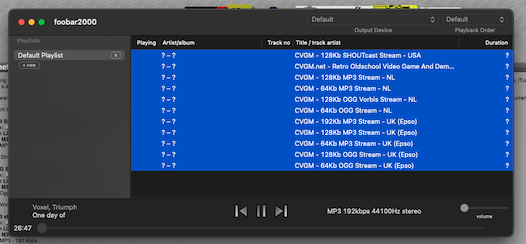 And from there you can just select whichever stream you want! Additional Slacker Services One of the new services i've installed on the new Slacker server is an uptime monitor. In the past, if the streams went down, I had no way to know unless someone told me (especially when out of town) so now it monitors the site & services, and if a problem is detected it'll notify me on the Discord server, which will also go to my phone. Currently i'm monitoring the main CVGM site, the Slacker streams and the SHOUTcast server. A notification is sent when the service goes down, and another when the service is restored again. There is also public page that anyone can check at any time to see uptime stats and information about CVGM - http://slacker.cvgm.net:3001/status/cvgm Discord Server The Discord server is fully up and running, and is accessible by anyone by using this link - https://discord.gg/Wezm6KcQKk Feel free to pass it around and invite anyone to it. While this won't take over the OneLiner, it does help with a few other things. Not only will it get the notifications mentioned earlier, but it will also post when code changes are made, issues are genreated etc. on the GitHub repo. Currently, the CVGM 2 codebase is not going there. Well, i've been typing too much here, and I hear a beer calling my name! I hope everyone has a great night!! FishGuy876 |
| Quote | |
|
FishGuy876 FishGuy876 / Brainstorm
495 Posts #2255 (1 month ago) |
A significantly large number of fixes have been applied to the codebase this last couple of weeks, as I start messing around with modernizing sections of the code to work with newer versions of everything. And to think everyone thought I was being pretty slack in the last couple of weeks! One of the biggest holdbacks of upgrading to a newer setup was the virtual environment used, most of the packages were thought to be obsolete and broken, so I started there first as I attempted to clone the site to a newer version of Debian (more on that later). But yes, the word is out, there is some major upgrades coming over the next few weeks. Thanks to a super helpful post over at StackExchange by someone trying to do a similar move as mine, I discovered a truly awesome command in pip I had never really paid any attention to before - 'pip freeze'. This takes all the packages currently installed on the system and writes them with version numbers in a typical requirements.txt format. Same post also talked about other problems that occur with this, biggest other problem being that django would never install any of it's admin panel templates and data files (meaning the front of the site worked fine, click on anything Admin related and it just breaks/404's all the time). If wheel is present, pip builds the wheel first and django1.3 scheme[data] and scheme[purelib] get overridden and the template files are stored outside of the site-packages location causing the 'TemplateDoesNotExist' errors in Admin. The freeze data was significantly different from what my code repo says I should have, and I was able to use that data to successfully create a new virtualenv environment to correct all version numbers and missing dependencies. The Bigger Bigger Fixes: - The new dev server (CouchPotato!!) is currently running Debian 13 (trixie) with a Docker image containing an older version of Debian (11, Bullseye) - As reference, the current main server runs Debian 9 so I went with a version that still hosted Python2.7 and other compatible systems as most packages/repos for 9 are no longer available. The upgrade from 9-11 was worth the case of beers and shitty brandy it cost to get me through all the errors/bug hunting!! Bullseye went EOL at the end of August this year and package list is pretty solid. CouchPotato and Slacker hang out together at the same datacentre over at FastHosts. This docker setup will let me move versions and test environments around a lot faster than nuking the box every time I want to try something new. - Pip environment updates: v20.3.4, Venv v20.15.1 (newer versions won't install Python2 environments) - last versions supporting Python 2.7. Requirements must be installed via --no-wheel to allow django to install correctly, pkg-resources==0.0.0 must also be removed to prevent pip from breaking on Debian. - Dev server using much newer MariaDB SQL Server (10.11.19) than CVGM's ancient MySQL install (5.7.3.4); Upgraded from MyISAM to InnoDB. This version of the database is still currently supported. The upgrade won't happen on the main site until I redeploy the whole updated codebase - Too many things can go wrong. It currently works and will stay with some tweaks for performance. - Upgraded to nginx 1.26.3 and uWsgi 2.0.31. This is now the main server running the site for a massive backend performance and speed increase. Some changes made to the event handler code to make this compatible as some parts are now missing/changed from before (gevent). - SSL certificates are now correctly using CloudFlare, which are good until 2041 and all smaller certs auto-renew so we no longer have to pay for anything SSL. - In the event that the site reboots randomly anymore, the system waits a full minute after reboot and will auto start all streams and services automatically. The site should be 100% stand-alone now. Still monitoring this as time goes on. Other Code Changes: - Fixed the bugs that were causing the streamer to crash after playing a large song (more than 100 minutes, 6000 seconds). The bug was actually caused by sockulf/mysql timing out. Fixed so it disconnects every time a change is made (auto-reconnects when it needs anything anyways) instead of continuously holding onto a connection forever. - Fixed some other issues in the streamer code, and it is now building against the latest BASS files (Went from 2.4.0 to 2.4.18.3), which also fix a lot of other things internally within their own changelog. - Fixed building dependencies in the streamer code. Everything should now make and build normally via configure and make. - Dscan now has a logfile and logs everything about what is being scanned through it during an upload. This was added to test bass and some other issues I ran into during the migration to the test server. - Fixed a bug with searching for songs and other items that sometimes ended in a 500 error, or a massive system hang. That should no longer happen anymore. - Searching now updates approximately every hour. The script is working, but it is pretty slow, and will make it faster once I get the wrinkles out of it. The site no longer freezes the server at night to spend an hour or so rebuilding the entire search index. - Made some SQL tweaks to the webview_queue_played and webview_queue_song_requested indexes for more general site speed. - MySQL Changes - Fixed several DB indexes for speed. Many of the site commands were checking all 2.7m queued indexes for song history, long lists for oneliner history, every time. By fixing this and making it more sensible, the speed has increased dramatically because it's not checking every single entry in the applicable table anymore. Applied some more optimal my.cnf changes to help with caching, join tables etc. The site had a lot of cache evictions so this should now stop. - Forgotten songs page was not cached; Fixed this and load times went from 20 seconds down to 8ms. on average. The page is now properly cached inside memcached for 1 hour. - Some 500 url's were returning an error, because they had an error in the error, and not the real error that was actually happening. The screen should no longer be white with a small text, should be a site-actual page with the error and use the default theme. - Fixed several issues with tags that always caused site lagging. Limited the maximum number of consecutive tags as it was killing the SQL server. Currentl;y it's limited to a maximum number of 4 tags, more than that stops offering a + link. Crawler bots had as many as 35 tags at a time. Tag pages no longer hard-coded at 300 songs per page, it is now controlled by a variable in settings - TAG_SONGS_PER_PAGE and defaults to 50. - Tag caching fixed so that it now stores data in memcached correctly. Some of the data being stored was too big and therefore not accepted by the 1mb limit due to the incorrect way tagging was working. - In addition to the above tag work, I have set up Cloudflare to monitor tags and block when robots request excessive amounts of connection, if it happens they will be blocked automatically for a period of time. This should prevent the site from getting completely hammered. - Statistics -> Random now generates a page with 100 songs available to queue. It no longer mixes with locked/unlocked songs. My previous fix at this was wrong and didn't take effect because I forgot to remove the old call that deleted the correct results right afterwards. Doh!!. - Screenshots - Fixed Pouet screenshots being pulled from http links, now they correctly pull from https. Fixed a bug where pouet would save multiple copies of the same screenshot. Fixed a bug where pouet images would error out if the name of the production appeared twice (shows up in sockulf output screen), so now they generate unique screenshots if needed. Removed 48,691 orphaned images from the filesystem totalling 1.229gb. Removed 422 orphaned thumbnails (most likely rebuilt thumbnail images, not attached to anything). So yes, I have been busy hehe. Still a lot to do, I have notes everywhere in my OneNote but work is commencing on upgrades. With these changes alone, things like loading favourites, browsing the site and requesting songs should already show a significant boost to what they were before. As always, if you have any problems or issues let me know. Once I clean up a few more things in code, and confirm search is working etc. I will commit all this to the repo. Enjoy!! FishGuy876 |
| Quote | |
|
FishGuy876 FishGuy876 / Brainstorm
495 Posts #2256 (1 month ago) |
Fixed an issue with DJ Random and MOOD_LEAST_VOTES Previously, DJ Random would always pick one song that was in the lowest played/lowest vote category, and would always be predictable in that it always picked the most recently uploaded song first, instead of any random song with the same zero votes. Code is now adjusted with a variable, POOL_LEAST_VOTED_SONG_COUNT_SIZE, where the DB picks that many songs that fit the bill (similar to Statistics -> Least Votes page) and it'll pick a random one from that pool. For CVGM, I set it to 200. Ordering is sorted by rating, then random. So if it only has a handful of songs that are say, 0 votes, to keep the count at requested amount it will also pull some 1 vote songs. Whatever doesn't fit, random takes over. On CouchPotato i ran some manual database queries. There are currently 2,899 songs without any votes. More than enough to satisfy this request for a while, then 1 will become the lowest. Ther are 10,171 songs with 1 vote, 5,272 with 2 votes, 2,661 with 3 votes. Plenty of space!! Thanks to LimeProselyte for putting this "I wonder if I did fix that?" moment in my head after our conversation earlier today! Admins can select this mode any time by changing DJ Random mood to "Songs That Need Love" hehe FishGuy876 |
| Quote |
 Reply To This Forum Post
Before posting a new topic, or replying to an exiting one, please make sure that the content follows the guidlines for the website.
Please log in to post a reply.