





CVGM Radio

 Development Area » New CVGM Site Code Changes
| Author | Thread |
|---|---|
 FishGuy876  FishGuy876 / Brainstorm  


498 Posts #2261 (1 day, 6 hours ago) Viewed 27 Times |
Hi everyone! It's been a long time coming, but here is some info on the newest changes that have been arriving at CVGM over the last few months. Some of these code changes started more than 2 years ago. This will be a long-winded post, so prepare yourself with a nice cold beer of your choosing! There is so much changed, im sure it'll feel like im going back and forth a bit, so i will try not to go too crazy. I'll try to categorize it as best that I can. First Things First - A New Server! Yes, after about 8 years we have finally gone ahead and upgraded to a new server, one better suited for CVGM's ever-expanding needs. The new server is now running 64gb ram (compared to 16gb), an Intel Xeon E-2236 (6 Cores, 12 Threads @ 3.4Ghz). Overall, the new server is about 2.5x more powerful than the old one. The newer CPU's have extra commands aimed at streaming and encoding, so that naturally fits us much better. The old CPU was from 2010!! Top this off with a nice raided 4TB disk system, 2x 4TB drives, for even more upload goodness! We were at about 50% of the old servers limit before, so space is always welcome. The new raid when benchmarked with GeekBench 6 was running on average around 191mb/sec, vs the old 52mb/sec. Perhaps some of the other reasons behind those low-level performance increases, is the server is now running the current LTS version of Debian 13. This allows us to use settings such as huge page memory. More on the back end changes a little later. It's been a long time coming to finally get the code off of the ancient Debian 9!! The new server is no longer with Joes Datacenter, I was able to find a much better deal elsewhere. Major Backend Changes The entire codebase has been re-written. We no longer rely on Django1.3/Python2 to do any of the work. Piece by piece, it was ported over to Python 3, with the latest Django 5.2. I started with the front-end to get templates etc. working correctly, then worked on the events system, the database, and the last heavy job was tweaking demosauce to work better. More on Demosauce later. I ditched memcached and went with valkey/redis instead as it is supported directly by Django. I have been absolutely blown away by the power and performance of valkey, and I wish i would have discovered it a lot sooner as it would have made my life a lot easier! Memcached was nice in that it cached some template page data, and a few queries, however it was reaching the end of its performing life on the site, with about 70% of the old cache data getting evicted on a regular basis for various silly reasons, mainly because of size and memcached rejecting certain objects. It was also an older version that couldn't be updated at the time, without breaking lots of things. I think one of my favourite things about valkey is the cache - I can store a lot more than just page templates, and it's easy to add more types to it such as sessions and other data. Cache is auto cleaned periodically, and it keeps backup snapshots so if the system reboots, it loads that cached data back into memory and continues to serve data at lightning speeds, instead of waiting for the code to rebuild that cache from queries. At the same time, I replaced MySQL with PostgreSQL 17. Now, back when I started using postgresql 15 years ago, it wasn't the powerhouse that it is now. Some of the major benefits of this change include faster queries, I can run the entire thing in memory, and it also has some unexpected features when it came time to fixing the song searching (more on that a bit later too). Web front end is powered by nginx and gunicorn. No need to talk about nginx, it was always the better option to use. Gunicorn is updated far more frequently than uwsgi, so there was no reason to keep the old code when this was all ported over. Nginx is configured to work with our Cloudflare settings, which adds an additional layer of security to the site, and has significantly reduced the amount of spam users the site was getting. I have added other anti-spam measures to the site as well. With all this setup combined, and the code changes, things are running dozens of times faster, and im happy that my favourites list no longer takes 30 seconds to load (currently loads in about 5 seconds). All systems are now powered by systemd services. Once of the problems I had before was every time there was a crash, or the datacentre had a power problem, the server would reboot and leave us in the lurch and I would then have to manually start sockulf and the stream services so the music would start flowing. Now that everything is ported to a service, this is done for me and I can restart any piece of it manually. All of the events systems, such as the oneliner/queue/queue history/now playing is all now pushed through valkey so there is almost zero code that needs to deal with it - It just gets what it needs from valkey and continues on. Valkey stores the last 50 events (this can be configured in the site settings) so when the browser checks history, its pulled 100% from this cache. There is no real performance improvement making this much bigger, unless the site is changing more than 50 things a second and the existing cache just can't keep up to the browser. If you let your browser sit idle in the past, when you can back it would try to catch everything up, now it just refreshes the entire live page data so the oneliner etc. are current. This works well, so if you're mid upload or. mid oneliner message, the partially entered data isn't lost. - JSON Backend - The site has an XML backend for third party apps to connect and get data such as queues and other data. There is now a much better JSON backend. I encourage anyone developing 3rd party apps to use this instead of the XML. You can query the list of JSON data at any time from https://www.cvgm.net/demovibes/api/v1/ where it will give you info on which services are queryable. For example, get the last 200 lines of oneliner chat: https://www.cvgm.net/demovibes/api/v1/oneliner/ Formatting is deliberately human readable. This service will continue to improve as time goes by. Hidden profiles don't have data returned in results, such as profile names and flags etc. but the text they typed in the oneliner is still shown. Site Security - CSRF Protection - The site uses this across the entire site. Forms, uploads, queueing and voting use a special token thats used to validate where the requests came from. Personal notifications, such as messages received and other notices to logged-in users also use a special token thats only viewable by you and your profile. That token expires after a short period, so theres no risk of it being exposed anywhere. - Cloudflare - This is now on every sign-in page. We use the turnstile method, and one hidden honeypot field in code thats designed to catch out most bots. Humans dont see it, but the bots do and assume its a valid response and therefore fails when the response is not correct. It also looks at the amount of time it took to fill in the fields. - More Cloudflare - Pages such as Tagging are protected with nginx and Cloudflare rules that prevent bots from hammering it like before. In code, only registered users can view tags, and a few other page sets. But crawlers in general are limited to how much data they can scrape at once, and even if they find their way to valid tag data, they are rejected if they don't have a valid session id. - Bot Protection - To prevent user spam, the site will only accept 3 sign-ups per address per hour. If they are junk accounts, we will see them and ban the IP anyways. Blocked IP addresses and email addresses are always checked, and should a genuine user fall into that problem, it will tell them to contact me directly to fix the problem. - User Profiles - You now need to be logged into the site to view someones user profile. 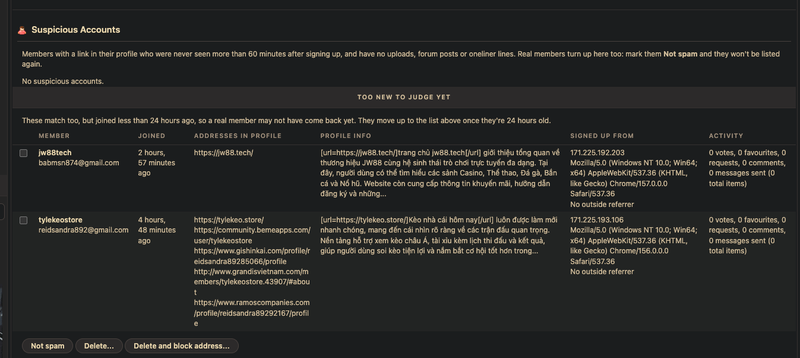 General User Changes - SceneID Support!! - Yes, it's finally in and its working. If you have an existing SceneID you can use it to log into CVGM. The first time you log in, it will ask you to link an existing account, or set up some basics for a new one. You can use either account to log into the site. The old code for SceneID has been completely removed, it was never really used here. Anyone who had an old account can fill out the password change form for their account, or reach out to me with email and we can get them back into the site. - Improved User Security - The login details for users are much more secure now, compared to old Django 1.3. When users log in for the first time with their old credentials, the security level on their passwords etc. is automatically updated to PBKDF2 hashes. Noone has to reset a password or re-create an account to get back into the site. - Hidden Profiles - A user can elect to mark their profile as Hidden, same as before, but it has been improved. If your profile is hidden, it'll hide your name and flag from statistics pages, overview lists, song vote history, song comments and user statistics. The name is kept in the oneliner, but not the flag, location, contact info etc. Hidden profiles do not show up in search results. Staff members will see your info, with a note reminding them that it's hidden. - User Overview - When you first log in, or click the "My Overview" link in the top right, this page is built for your own experience. It shows some statistics about your account, if you have any messages or other items pending and links to a few other pages on the site. You can also see other things, such as what you have waiting in the queue, you can see your rankings for favourite counts, votes etc. These rankings will offer info on how close you are to passing the next person above you in the order. Staff members will also see if anything needs taken care of, such as pending uploads. The bottom of the page shows a list of recent votes, and who placed them, and the most recent song comments. Setting your userprofile page to hidden will prevent your stats from being shown to other users (they'll just see a [hidden] name entry) but it will also prevent you from being able to view everyone elses stats. Staff members will see your name, with an indicator it's hidden. - User Preview Cards - Hover the mouse over a username on the site and it'll bring up information on the user, such as how many uploads they have submitted, how many times they have voted etc. along with their avatar. Know who you are talking to at a glance. A card will not show for a user with a hidden profile. - Custom Smileys - There is now a "Smileys" link on the left side of the user pane, just above the oneliner. This shows a list of all public smileys, their codes, and what they look like. The old smileys link under the oneliner still works the same way. The smileys page lets you submit new smileys! Browse to a file, pick a code, add some text if you want it to be hidden and click Upload. A member of staff will then review it and approve it as necessary. The smiley you upload does not have to be pre-sized (it could even be a single image, its not limited to just gif) as the code will resize it down for you to fit the oneliner view, it'll try to optimize it and make sure it loop's forever etc. You can upload some larger files as the size is based on the scaled result, but there is a limit so that you can't go too crazy. This upload feature is limited to members who have had an active profile for at least 1 week. - Fixed Flags - Flags now work again and all new users get their country set by default. Any user can reset their flag to their country by clearing any existing flag code, and saving your profile which will cause the auto-update event to occur. - DJ Random no longer appears in most of the site stats. - You can now vote in 1/2 stars!! Queue, History, Compilations & Favourites - Optimized Song Entry Queries - The backend queries to anything that requests song info for favourites, song pages etc. has been dramatically altered to boost performance. Small things, such as scanning the entire list of history to make a count, have been removed and placed with more optimal versions. History, for example, for some queries was actually scanning every song ever played every time, before completing a query. By getting this in check, many speed improvements were already appearing. - Optimized Queue List - The site admin can specify a number of songs to max appear in the queue. The default for CVGM is 25. If the queue contains more than that, it'll only show the next 25 requests, with a message underneath saying how many more requests there are, and how much queue time is currently left. By limiting the queue, we get some performance increases. For example, on a song switch, all 2.7m queue history lines were scanned by the code when sockulf changed song. By cutting this silly scan out, song switching and queue updates are almost instantaneous, and the stream never lags/delays between what you see on the page, and what you hear (some delays still come from other streams lagging behind). - Favourites can now be sorted by Platform, such as Amiga, making it easier to add from a single platform. they can also be viewed as pages, or a long list for yourself and other users. - Compilation forms have been fixed, and many of the old hard-coded fields such as zxdemo have been moved to the new General links databse system. Compilation Icon now is fixed and uploads, if it's too big it is scaled down to fit. The same happens with Groups and Labels. - Compilations no longer show NaN:Nan times when forcibly added to the queue. - Compilations can now be scheduled to be played, specify a time you want it to play and they will be inserted into the queue (the current server time is displayed to make it easy to plan a time). Optionally, clicking the "Add To End Of Queue" button will just queue them at the end of any existing entries in the queue. - New Statistics - Non Voted - Shows a page full of Random songs that are available to queue, and you have never voted on. Oneliner, Forums & Related - Oneliner History - Oneliner history page now only shows the last 200 entries, the number can be set in the site preferences. The old seperate pages have been removed, and users still cannot see anymore history past the last 200 entries. - Oneliner length has been extended to a maximum value as defined in the site settings file. The old 256-character limit was a bit small, especially after adding links etc. - YouTube - Users can now choose if they want to see YouTube links in the oneliner as plain text links, or show a screenshot for it. Paste in links as before, youtube shorts have also been added as supported. Site Admin settings also determine if the general public sees links or screenshots by default. Time stamps on pasted videos are supported, both in the oneliner and in the forum. - Smileys - Smileys no longer rely on Python code, and have been moved into the database. Users can request them as mentioned above in the Custom Smileys notes. - Other fixes - Fixes to the cache, so they are stored better (they never really change after being entered). - Forum Fixes - Updated the editor in the forum to SCeditor, an open-source lightweight editor that's very customizable ( https://www.sceditor.com/ ). The editor works as a WYSIWYG editor, and has two modes, Real View, and Source Mode. The button on the far right of the top of the form toggles between the two modes allowing you to edit in real-time and view as source, or the other way around. The old editor worked more like the source view. Added custom buttons to let you insert smileys, HTML links, and lots more. You can link to remote screenshots by pasting in the links, and even adjusting size. You can also search for existing uploaded screenshots (and it will show you tiny thumbnails). Click the music note button to link to almost any other site item. Select the type of link (song, queue, artist, group, label, album, platform or user) and start searching in the text box. Results will start to show, select the one you want and it'll convert it to the numeric equivalent, and insert the code. Staff members, and those with the right permissions, can drag and drop images into a forum post and they will be auto-uploaded to the site and scaled to fit. - If you missed the fun with the new code tag, check out this forum post - https://www.cvgm.net/forum/thread/697/#post2260 It lets me do cool stuff like this: **** COMMODORE 64 BASIC V2 **** 64K RAM SYSTEM 38911 BASIC BYTES FREE READY. 10 PRINT CHR$(205.5+RND(1)); : GOTO 10 RUN Workbench disk. Release 1.3 version 34.20
1> dir df0:
c (dir) devs (dir)
fonts (dir) libs (dir)
s (dir) system (dir)
utilities (dir)
Disk.info Preferences
1> echo "Only Amiga makes it possible"
Only Amiga makes it possible
1> Amstrad 64K Microcomputer (v1)
(c)1984 Amstrad Consumer Electronics plc
and Locomotive Software Ltd.
BASIC 1.0
Ready
10 MODE 1: BORDER 1
20 PRINT "CVGM ON THE CPC"
runNow Playing, and Related Sections - YouTube - The Now Playing youtube player is now 100% compliant with Google's location/parking code for embedded videos and should significantly reduce the overlay that appears asking you to verify you are not a bot. CVGM is registered and should stop that. - New Listen Window - A brand-new Listen Now window has been implemented with a lot more information about the song being played. You can also vote from this page, and it too auto-updates when songs change. The browsers media controls are auto completed with the playing song, and support artwork to represent the site. CVGM uses the Cat with a GameBoy that Ultrasyd made for us. Depending on the computer used, if your screensaver is on or the PC is locked, the screen will show that artwork and the song playing information. Its still a bit picky on some OS's that dont fully support the feature. - Screenshot code has been optimized, especially with Pouet. The old site would freeze up from time to time fetching screenshot links, and the database had thousands of duplicate screenshot images (caused by a bug with the song re-saving itself every time it was called). The duplicates have been removed, and the code fixed properly so there is no longer a delay when querying pouet. 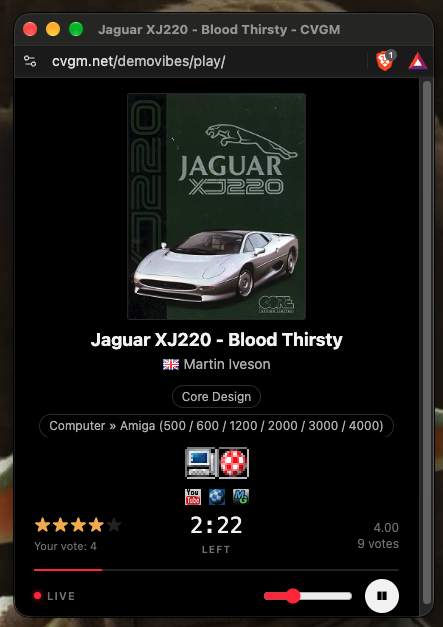 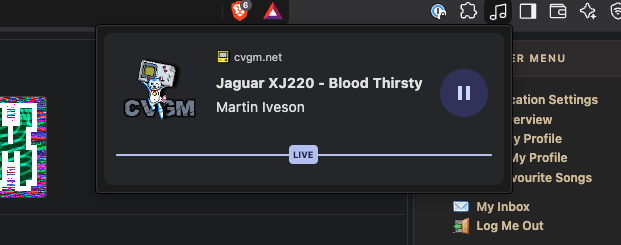 Search - PostgreSQL Backend - The search now ties into the postgresql database more than ever. Due to the way it works, i no longer have to add third party tools such as Whoosh and Haystack just to scan data and collate lists of information together, so things like uploads are almost instantly added to the search indexes. - Search Appearence - In the Search For something box, now when you start to type it's going to start auto-suggesting results for you, and displays best-match results first. Artists, songs, forum posts etc. are going to start appearing and the more you type to narrow the result down, the better it will be. At the bottom of the pop-up page is a new link for "All Results For ..." which will take you to a seperate page and show more info on the data entered so far. Enter just "Du" and view all the results, and you will see what I mean. For stuff thats accented, it also takes into account for the special letters and tries to help you out if you can't type them on your keyboard. Hidden/Inactive songs are no longer shown in search results. - This same auto-completion of songs has been added to many areas of the site, such as Compilation creation. Uploading a Remix? On the upload page, click the "Search By Title Or Artist" box and start typing something in, such as "Operation" and you will start getting a list of songs back in the form of [Song y Artist [Platform]] so you can really narrow down the search results. Select the correct entry, and the RemixID is auto inserted into the box for you, and the description of the song is listed underneath it as a confirmation. Almost every field that needs a song ID works this way, including all the Admin panels for adding queues etc. 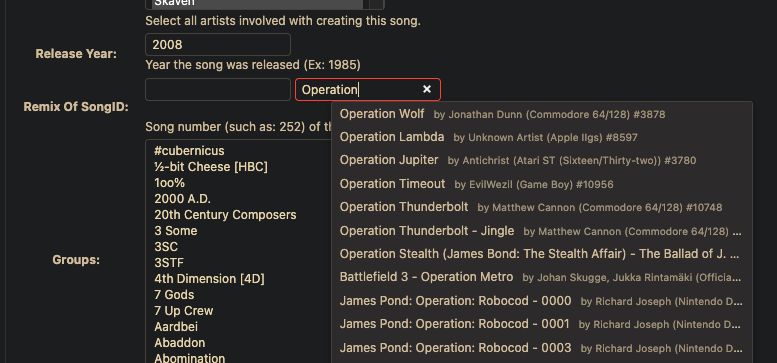 Demosauce Streamer, and Related Systems The streamer has had a significant amount of work done to it, to bring it up to modern standards. The sockulf scripts that run in the background have also been updated to run on the latest version of Python, and run in the background as a systemd service. How songs are scanned has also changed. The code now scans the uploaded file and measures the replay gain as normal. It will now look for other things, such as the channel mixing (if songs like Amiga are hard left/right encoded) and make some decisions for the site page based on that. The channels are analyzed, and a stereo correlation is determined, and compared against a value in STEREO_AUTO_MIX_BELOW (default of 0.15) to determine if the channels should mix together or not. If the correlation reading determines a value of 1.0, it means that the Left & Right channels are the same, a value of 0 means they have nothing in common together (typically hard-panned channels that sound different in each ear), and a value of -1 means one channel is the other, turned upside down (this would crash some ogg scans previously). Once the number is calculated, is it's between a value of -0.15 to 0.15, the song is considered hard panned and the channels are mixed at 40% (each channel gets 40% of the other). This reading sounds pretty good on stereo headphones, without the song sounding too one-sided. There is also a check for the Flip Right Channel being left blank, and the reading it gets is -0.5 or lower, in which case the channel had been stored upside down (the song sounds hollow, and not very loud on a mono speaker) so the streamer will flips the right channel back before doing anything else. This only happens on a few file formats. On a song such as [queue]674[/song] a staff member will see this information: Stream Changes: Blend 0.4 (automatic) Stereo Correlation: 0.00 Stereo Mix: 0.4 (automatic: correlation 0.00 is within ±0.15) Flip Right Channel: no (correlation 0.00 is above -0.5) Replay Gain: 2.75 dB That means the scanner tool recognized the MP3 file is completely seperated, and applied automatic mixing to it at 40%, so now it will sound much better. A song such as  Reflections 2 - Federation by  4-Mat (Matt Simmonds)  handles the channels much better with the Left & Right, so it dod not automatically apply mixing: Stream Changes: None Stereo Correlation: 1.00 Stereo Mix: auto (demosauce: 0.4 for Amiga MODs, none for the rest) Flip Right Channel: no (correlation 1.00 is above -0.5) Replay Gain: -3.37 dB The Turrican 3 Soundtrack MP3 files have flipped channels, if I use Turrican 3 - Factory Action
 by  Chris Hülsbeck
as an example, it produces this scan result, which is now why they sound so much better on the stream: Stream Changes: Right Channel Flipped (automatic) Stereo Correlation: -1.00 Stereo Mix: auto (demosauce: 0.4 for Amiga MODs, none for the rest) Flip Right Channel: yes (automatic: correlation -1.00 is at or below -0.5) Replay Gain: 4.55 dB So there are some examples of what the scan is looking for. Of course, sometimes it gets it slightly wrong, and thats why each page shows this information to staff members, they can still go in and edit the song information to tell demosauce the play the track as intended, with full stereo seperation or change any of the other settings in relation to it. Any setting applied by a staff member will always override the automatic scan. Here are some of the other changes to the streamer and it's services: - Demosauce now builds against ffmpeg7 from debian apt, vs. ffmpeg4 in the old code repo. We are also using the most up-to-date version of BASS. This change alone brings in many fixes and optimizations to the streaming code. The BASS update fixes several mods that didn't sound right before. All build files and config scripts updated to make sure they work with the current linux distros. - Fixed the issues where long songs would crash the streamer after they finished streaming. The code now monitors the health of it's database connection to prevent that from happening again. - DJ Random is no longer required to make it work; You can now specify any name in the site settings, and it is used to display something other than "djrandom". If not specified, the site would continue to use djrandom for the display name. The username can be different from a display name, so none-compliant usernames can now be used. Example: Username: 'djcvgm' Display Name: 'DJ MixMaster CVGM!' - Fixed how artists and song title tags are carried across the stream, especially for OGG streams, so now when played on an external player such as foobar2000 on mobile, it does correctly seperate the Artist from the Song, and no longer tries to create one long line and make it the title. - Improved Song Scans and Readings - The streamer now scans the song files more in-depth than ever before, it can detect things such as single channels, it can auto-detect panning in MOD and other files and suggest site player settings accordingly. Amiga MOD files are automatically played with channel mixing at a value of 40%, so if the song has hard left/right channels, they appear somewhat mixed on the stream and are listenable. Scanner does the same thing with MP3/OGG etc. so if someone uploads a hard mixed mp3 of an amiga song, it will apply the channel mixing. - New Scan Tool [dpreview] - In the past, an old jave plugin was used to allow the staff to preview MOD formats in the Upload window. That has been broken for quite some time, so now I have a new tool - dpreview. It will take any uploaded file, of any supported format, or any Listen request from a song page, and apply the sites listening settings as mentioned above, and create a temporary file. That file is then linked to the Listen button, or to the audio player in the Pending Uploads window, and when played will sound exactly the same as it would play over the stream. Site code will build the preview file only if it doesn't exist, so an upload page with 20 songs on it might take a few seconds to generate for the first time, then after that it will be instant. Temporary preview files can be purged every few days, depending on how often you make them. - Scripts added to scan the whole mucic database for changes, if we alter a setting or fix something in code. So, theres a bunch of the changes in a nutshell. There are a lot more obviously, but these just summarize the majority of them together, and I apologize if I have repeated myself. In the next few weeks, i'll finish writing the comments in the code and strip out the bits im not happy with, theres also a lot of commented out bits in there that should go, to prevent accidental usage. I'll try to get everything ready, and push it to the public repo when im at DemoSplash later this month. I also dedicate this release to our friend Syd - https://www.cvgm.net/demovibes/about/ Thanks to everyone who has supported the site, your feedback and criticism has been great! There are more changes coming, so if you have ideas or feedback, please let me know here or in the Oneliner. There are a few things that still need fiddling with, so I will work on those as best I can!! Enjoy your weekend! FishGuy876 |
| Edited 1 day, 6 hours ago |
 Reply To This Forum Post
Before posting a new topic, or replying to an exiting one, please make sure that the content follows the guidlines for the website.
Please log in to post a reply.